29 September 2006

Apple Keynote Bloopers

This is super funny mix of many of the Apple keynote bloopers. I'm sure it's been around a long time, but I just discovered it. I've helped with behind the scenes for demos and presentations at MacWorld for Microsoft. When you are doing the demo or working to setup things behind stage, it's amazing how challenging it is to get everything right. The most important tips for doing this kind of thing are:

  1. Practice, practice and practice.
  2. Have multiple backups: hardware, software, everything!

via João Bordalo

27 September 2006

MBUSWAT

Note: This is a re-post of my 1st post on our Official MacBU Blog, Mac Mojo. If you haven't added Mac Mojo to your blogs to read, I'd recommend it. I'll be posting over there along with about 10 or so other folk in MacBU. Check it out, I think you'll enjoy it. --- Hello! My name is David Weiss and I'm the Automation Test Lead in MacBU, which means that I build stuff to help us test our code better. It's a great job. I could give you a detailed introduction, but I've kinda already done that. I could talk about automation practices or our sweet beowulf cluster, uh, I mean automation setup, but today, I'm not going to talk about work, at least directly. Today, it's all about the food! Since the MacBU was organized in 1997, we've moved from building 17 to building 44 and then to building 115. Change is one of those constants here at Microsoft and physical location is not excluded. Building 17 was the long time abode of Office, Win and Mac. When we moved to 44 it was the first time we were physically separated from the Win Office team which allowed us to develop some of our own unique identity, but the best part of building 44 was the conference rooms, or the food associated with, the conference rooms. I don't know how it is at other corporations, but often there would be a morning or afternoon conference room meeting and catering would be provided. It didn't take us long to notice that after the attendees had finished eating and returned to their meeting, there was a small window of time where the food was available before catering would clean up the food and toss it out. Being the ecologically sound individuals we are, and dissatisfied with waste of any kind, we setup an email alert system. One of the team, we'll call him Matt, setup an email rule on his machine so that any email sent to him with a subject that contained the text "[Food]" was duplicated and forwarded to other super secret food recon agents. In this way, we remained successfully "below the radar" of counter intelligence units. Until, of course, Matt turned his computer off. When that happened, we were all downgraded to free-pop-only status. After about 2 days we realized that we had totally missed one of the key aspects to an Official Microsoft operation, and that is, of course, a whole bunch of letters stuck together in a crazy acronym and the FAQ explaining it. What did we name our operation?

MBUSWAT: The MacBU Sustenance Watch and Acquisition Team!
Our Mission Statement: To seek out and share information pertaining to free food available at work.
Generally the standard encryption technology used to prevent unauthorized eaters from viewing our confidential communiqués was white colored text. This worked until we found that conspiring developers had added a feature to expose our secret messages to prying eyes: Auto Preview. We increased our encryption standard to include about 3 lines of non-encrypted babble prior to the encrypted message. This method has been found effective to this day, even with modern email clients! Well, anyone familiar with food services and catering knows this one truth:
  1. Food quality degrades as the time increases in which the food sits idle, sad and unconsumed.
To combat this reality and better meet the cross group communication needs we developed a clear rating system (with easy to understand color coordination): Code Red: Food is available, but guarded by food service personal. Be wary of a status change. Code Yellow: Food is being consumed by conference room attendees. Soon we'll be able to move in. Code Green: Food is all clear. Act quickly, or you'll regret it. Code Brown: Food is still available, but due to prolonged exposure, it may taste like, well, not so good. Code Puke Green: Food is still there, but eat at your own risk, it looks or tastes nasty. With this plan in place, communication improved significantly, but alas, we continued to be plagued with the dependency on Matt's computer being fully operational. Since Matt, being the good tester that he is, often found ways to crash his computer (in the days of Mac OS 9) and hang or crash his email client, we needed to permanently sever "the Matt dependency". We did this by creating a distribution list on the mail server. The end result is that anyone who sent email to "food" would have that email sent to all who participated in the super-secret-group-mission of free food recon, disclosure and consumption. However, this efficiency gain significantly increased our exposure to being "outed" by the catering overlords, so while we stealthily kept the short name of food, we changed the friendly name of the alias to, "Mac Crossteam Discussion" which has kept us safe ever since. All of this lead to a namespace collision with the .NET team here at Microsoft. It all started with this fairly benign email:
From: Snax.Net To: Mac Crossteam Discussion Subject: New snacks reported at Snack.NET! A new snack in the Candy category has been reported in your building. Here is a description: So much peanut brittle you'll be sick for days. Log on to Snack.NET for further details! This email has been generated automatically. Do not reply to this email. If you would like to be removed from this list, please visit the Snack.NET website and unsubscribe. This has been a recording.
Of course, this kind of tempting notification led to simultaneous surprise, fear and hunger. Our covert ops team immediately got to work. Soon we discovered that Matt Stoecker was the author of a "test application" named "Snax.NET" which allowed for companywide snack notification. As he was testing the mail notification system, he used our alias. After Mr. Stoecker clarified and apologized, Agent Snook followed up with the salient question, "Can we still get the peanut brittle?" Agent B expanding on that theme continued, "I think Agent Snook makes a good point here. One cannot simply suggest the presence of peanut brittle and then not provide some easy way to access said tasty treat. I, for one, feel heinously bamboozled. And, I fear, this feeling of bamboozlement will only abate with copious quantities of peanut brittle..." Not long after this email exchange two guys from the Snax.NET team showed up with 2 buckets of peanut brittle! Complete office delivery is way better than having to go out searching for leftover catering! Today, the Snax.NET server has gone to that great big bit bucket in the sky, but here at MacBU, we are still on constant alert for what goodies might befall us. And now you know, the rest of the story. ;-)

25 September 2006

Making Good on a Mistake

I just read the following email for Apple:

From: iTunes Store Support

Sent: Saturday, September 23, 2006 2:41 AM

To: David Weiss

Subject: iTunes: Your recent TV show downloads

Dear David,

Due to a system error, you were recently charged for downloads that were meant to be free. You were incorrectly charged $11.94 plus tax for your recent download of the three ABC season finales on the iTunes Store. We will reverse the incorrect charges and you should see the credit within 7 days, depending on how quickly your credit card company processes the reversal.

Our customers are very important to us and we sincerely apologize for any inconvenience this has caused.

Please accept these three video codes good for any $1.99 TV show or music video from the iTunes Store as part of our apology. You can redeem your codes by just clicking the links below.

XXXXXXXXXXXX

XXXXXXXXXXXX

XXXXXXXXXXXX

https://phobos.apple.com/WebObjects/MZFinance.woa/wa/com.apple.jingle.app.finance.DirectAction/freeProductCodeWizard?code=XXXXXXXXXXXX

https://phobos.apple.com/WebObjects/MZFinance.woa/wa/com.apple.jingle.app.finance.DirectAction/freeProductCodeWizard?code=XXXXXXXXXXXX

https://phobos.apple.com/WebObjects/MZFinance.woa/wa/com.apple.jingle.app.finance.DirectAction/freeProductCodeWizard?code=XXXXXXXXXXXX

If you have any questions or concerns, please contact our customer service team by replying to this email.

Sincerely,

Kate

iTunes Store Team

http://www.apple.com/support/itunes/ww/

Here are some things that make me feel like I actually matter to them, amidst the gazillion other folks that purchase stuff from them:

1. It's signed by "Kate", not "Some Random iTunes Drone" or worse yet "iTunes Store Team". It's really signed by someone's name! Kate, I thank you.

2. It was their fault and they are aware of it, before I even figured out there was a problem. Isn't that how it's supposed to be?

3. They are fixing the problem (refunding my credit card) but also giving me $$ for the hassle. Folks it's 12 bucks!

4. The email is text only, short and to the point.

5. I can actually REPLY to the email like a normal person! None of this "do_not_reply@company.com"

It's these little things that count. I'm biased already, but stuff like this just makes a customer for life! I've talked about customer support before, but I will happily pay more for support like this. It makes my day and amidst the many things that don't work right every day, it's nice to get an email that reminds me that there are some things working correctly even if "the system" is not. Thanks Apple. Thanks Kate.

21 September 2006

Inventory and Shipping Costs

The entrepreneur in me just beams with excitement reading this announcement from Amazon:

Fulfillment by Amazon beta An Amazon Fulfillment Services Group Fulfillment by Amazon (FBA) is a new program that makes delivering your Pro Merchant Program and WebStore orders a snap. You send your new and used products to us, and we'll store them. As orders are placed, we'll pick, pack and ship them to your customers from our network of fulfillment centers. Simple fulfillment. Better customer service. Inventory Storage — You still own your inventory, but we warehouse it. Pick, Pack and Ship — When a customer places an order we pick, pack and ship it. Powerful Promotions — Your items can be combined with other Amazon-fulfilled items in one shipment, so customers save on shipping costs. With Fulfillment by Amazon, you can offer your customers Amazon Prime, free Super Saver Shipping on qualifying sales through Amazon.com. Customer Service — We manage post-order customer service, including the return and refund process, 24 hours a day, 7 days a week. How it works
  1. You send us your inventory - Label, pack and ship your items to Amazon.
  2. We store your inventory - When we receive your items, we'll store them until an order is placed.
  3. We fulfill your order - When an order is placed, we'll pick, pack and ship the item, and may combine it with other items in the same order.
  4. We manage all post-order customer service - We'll manage post-order customer service and handle returns as needed.
Wow and double wow. So what about the pricing? Seems reasonable to me. Maybe Amazon does personal storage next? ;-)

20 September 2006

You can do it!

My Dad just sent me this inspiring quote by Marianne Williamson from A Return To Love: Reflections on the Principles of A Course in Miracles

Our deepest fear is not that we are inadequate. Our deepest fear is that we are powerful beyond measure. It is our light, not our darkness that most frightens us. We ask ourselves, Who am I to be brilliant, gorgeous, talented, fabulous? Actually, who are you not to be? You are a child of God. Your playing small does not serve the world. There is nothing enlightened about shrinking so that other people won't feel insecure around you. We are all meant to shine, as children do. We were born to make manifest the glory of God that is within us. It's not just in some of us; it's in everyone. And as we let our own light shine, we unconsciously give other people permission to do the same. As we are liberated from our own fear, our presence automatically liberates others.
For me, at least, this is true and reading it reminded me of a great post by Seth Godin on ways to defend the status quo:
Top ways to defend the status quo
  1. "That will never work."
  2. "... That said, the labor laws make it difficult for us to do a lot of the suggestions [you] put out. And we do live in a lawsuit oriented society.""
  3. "Can you show me some research that demonstrates that this will work?"
  4. "Well, if you had some real-world experience, then you would understand."
  5. "I don't think our customers will go for that, and without them we'd never be able to afford to try this."
  6. "It's fantastic, but the salesforce won't like it."
  7. "The salesforce is willing to give it a try, but [major retailer] won't stock it."
  8. "There are government regulations and this won't be permitted."
  9. "Well, this might work for other people, but I think we'll stick with what we've got."
  10. "We'll let someone else prove it works... it won't take long to catch up."
  11. "Our team doesn't have the technical chops to do this."
  12. "Maybe in the next budget cycle."
  13. "We need to finish this initiative first."
  14. "It's been done before."
  15. "It's never been done before."
  16. "We'll get back to you on this."
  17. "We're already doing it."
Let these phrases be warning signs for your mind. There is greatness to be had, don't let it slip through your fingers!

19 September 2006

MSNBC Video Supporting the Mac

Starting today, all video on MSNBC will now be available on the Mac without the need for Windows Media Player or Flip4Mac installed. Here's how it works:

  • If you hit the site with Win Internet Explorer 6 or 7 you get Windows Media video
  • If you hit the site with Mac FireFox you get flash based video It doesn't look like it supports Flash in Safari, but that could be just because I haven't got the newest version of the Flash player. Slowly but surely other groups at Microsoft are "getting it" when it comes to supporting the Mac.

  • 13 September 2006

    Joel on His MacBook

    Joel Spolsky talks about his Mac at home experience:

    I have a few complaints though: OS X antialiasing, especially, it seems, with the monospaced fonts, just isn't as good as Windows ClearType. Apple has some room to improve in this area; the fonts were blurry on the edges. Also, I don't understand all these people who say that Macs never crash. I probably had to reboot the MacBook Pro (hard reboot -- hold down the power button for five seconds) about every two hours. It was always the same problem: the Wifi network would go down for a second, something which happens to everyone, but on Windows, it just comes back, while on the Mac, I get a spinning colored ball and everything is frozen. Everything. Forever. If I try to wait it out the beachball will still be spinning the next morning. If anybody is aware of this problem and knows of a specific fix I'd love to hear of it. It was like a Windows 3.1 deja vu all over again thing.
    I've only recently been getting the same behavior. I agree with Joel that it has something to do with the wireless, but I see this happen most often when I VPN into work. This didn't happen before 10.4.7, so I think this is a new bug introduced recently. Also, while Apple's sub-pixel text rendering has improved markedly, ClearType on Windows still is just a bit better, but some fonts seem to work much better than others. My basic understanding of how sub-pixel smoothing works leads me to think there are only so many ways to do it, so it's amazing to me that you can notice a difference.

    08 September 2006

    Mixing Carbon and Cocoa

    Oh now this is so, SO refreshing and from a "Cocoa" developer no less! I don't know how many times I've heard the comment that we've got to re-write all of Office in Cocoa as if that were some magic pill that turns all Mac applications into "pure" Mac applications.

    Wake up people! It’s 2006. It doesn’t matter what you program in, it’s how you get the job done. Arguing about whether to use Carbon or Cocoa is like arguing about whether to use a net or a hook to catch a fish. You use whatever the circumstances call for. If you don’t, you die. (This, from the vegetarian, city-dwelling Mac programmer).
    Once again, it's all about execution. Now I love Cocoa (We use it internally to build all our GUI based tools) I love the design patterns and consistency, and I love CoreData and bindings, but very often if you want to do something cool, you almost always have to drop down to the C API and well, more often than not, you're using Carbon. Remember what Steve Job's said when introducing Carbon? "We named the API Carbon, because that's what all intelligent life forms are made of!" I'm personally looking forward to the end of the whole Cocoa vs. Carbon debate. Sometime in the future, applications will be judged by what they enable you to do rather than the API under the hood. If you want to get that concerned about the nuts and bolts, consider this the next time you fly: Every part that makes up every plane, came from the lowest bid supplier. Life's too short, find the right tool for your job and enjoy the ride!

    Microsoft Cafeteria Tour 2006

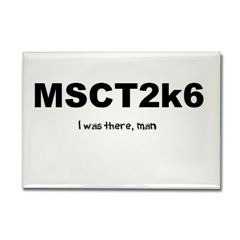
    You may not know it, but the Microsoft Redmond campus has like 100 different buildings. Okay, maybe not exactly 100, but there are a bunch, and for every 3 or so buildings, there is a different Microsoft cafeteria. Some buddies and I decided we'd try to visit each and every one, in Redmond at least, and document the journey. Everyone's always talking about Google's swanky eats, so consider this your Microsoft guided tour of our swanky eats. ;-) You'll notice us following in great MS tradition by naming our project something as approachable and easy to remember and understand as "MSCT2k6". Of course, we couldn't do this without some kind of memorabilia, so you guessed it, shirts, mugs, bags and yes, the MSCT Rectangle Magnet. As our tour leader says, "Consume! It'll make you feel better, honest."

    07 September 2006

    On Knowing Stuff

    I just heard a funny story about a little boy in Columbus, Ohio and it goes like this: A traveler came along one day and said to the little boy, "My boy, where's the road to Cleveland?" The little boy says, "I don't know." "Well, where's the road to Cincinnati?" "I don't know that either." "Well, could you tell me how to get to Toledo?" "No", says the little boy, "I don't know that either." Then the man looks at him rather disgustedly and says "Well you are an ignorant little boy aren't you?" To which the boy replies, "I may be ignorant, but I'm not lost!" One of the great things about children is their willingness to communicate and try stuff out. They are not afraid to say, "I don't know" and yet they seem to have such a clear view of things. It's refreshing, frankly. They seem to be born with this right from the start. In so many ways they are superior to us older folk in their ability to candidly interact with the world around them. I've been watching the TED presentations that, little by little, are being put online and one of the best talks I've seen so far is the presentation on education by Sir Ken Robinson. It's only 20 minutes long, so take a lunch break and "give it a go." If learning is important to you, I think you'll really enjoy it.

    05 September 2006

    Work and Play

    From David Heinemeier

    You don’t have to work hard to work well. You don’t need sinister eyebrows or only 4-hour sleeps or a booked calendar to be serious. But somehow that image sticks so bad that we tend to view fun as the opposite of Serious Business Stuff(TM). It’s a false choice, not a real fight. And you accept its premise at your own peril. Fun is all about creativity, innovation, play, experimentation, progress, and seeing real things come to life. If you make fun an enemy of business, you’re judging all these desirable concepts by association.
    I just had lunch today with one of our Excel testers and while we were discussing some testing ideas, she just blurted out, "I'm so in love with pivot tables! I just love them!" I laughed, but I loved to see the enthusiasm about of all things, pivot tables! Work can be play indeed!

    24 August 2006

    Be yourself

    I just found a great quote:

    Be who you are and say what you feel, because those who mind don't matter and those who matter don't mind. - Dr. Seuss - US author & illustrator (1904 - 1991)
    Do you matter? Despite it being a pedestrian principle, our patience with the differences we have with others is a good indicator.

    23 August 2006

    My Dream App

    So a new website has launched that intends to use the "wisdom of crowds" to identify the best ideas for a new "dream" Mac application. The registered users get to vote on all the ideas to narrow down the field, then judges will decided on 3 winning ideas. The net result will be 3 new Mac applications that will prove the, ahem, wisdom (or lack thereof) of those participating. I think it will flop. I hope it's wildly successful.

    Great ideas are NOT the limiting factor in software development! It's so much more about execution! Further, the driving forces behind great execution are much more multifaceted than a simple paper specification about how some application should behave. My favorite part of this process is:

    Customer: Please build X.
    Developer: Okay.
    (Time passes)
    Developer: Here is X!
    Customer: I know what I want, and X isn't it.

    It's everything that happens after this conversation that's important, not before. I liked what Daniel Jalkut says:

    This contest will do nothing except put a heavy burden on a small development team to turn somebody else’s ideas into the type of application that can usually only be inspired by the developer’s own dreams. Even when a team pursues a dream - their dream - success is far from assured.

    21 August 2006

    In hope of an iPhone...

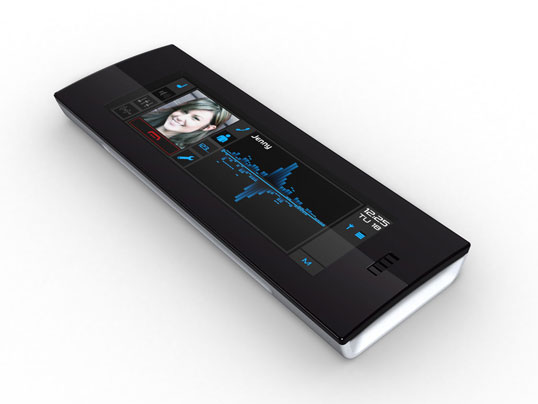
    Here is a phone from Synaptics. The coolest part about the phone? It has no keys, just one big touch screen canvas. I guess, if you are going to remove stuff in a drive for simplification, removing the key pad is about as far as you can go. On the other hand, this just puts more burden on the software designers of the interface to use the touch-pad well. My experience with touch screens has not been that great. The biggest problem I see is that without a pointer device, it's hard to get feedback on what you've touched because your finger obscures what you are touching. One way to solve this, is with huge buttons, that allow for a color change that you can see around your finger or thumb. The problem with big buttons is, well, they're ugly. Here's to Apple solving the feedback problem along with a clean and beautiful UI.

    16 August 2006

    Web Development for My Dad

    This is kind of a test, since I don't know what kind of expertise exists with you my faithful reader, but I need some advice, or rather, I need some advice for my Dad. He's 55+ and looking at getting back into the workforce and one option that has piqued his interest is web development. The question is this: What should he use as his web platform and why? Options that I've looked into are: Ruby on Rails on Mac OS or Linux WebObjects on Mac OS ASP.NET on Windows PHP on Mac OS or Linux Witango on Mac OS or Windows Note: I'm sure I've missed some others, but I think these are the big players. Keep in mind that he's used the Mac OS all his life as the basis for several of the businesses he's started over the years, so he'd like to stay developing on the Mac if at all possible. But it's not the end of the world if he's got to switch platforms. This has got to be a question others have asked, so if there's some web page that answers this directly, I'm sorry I haven't found it yet, but please leave the URL in the comments. Am I the only one that finds making a rational comparison in web development platforms difficult?

    15 August 2006

    Steve Portigal on Innovation

    From Core77:

    [Michael] Bierut felt he started off being too "clever" - which I hear as new for new's sake - and that wasn't the right thing to do. I don't think innovative means shocking, obviously new, different, and all that. I think innovation can be invisible and brilliant and seamless to adapt to, with that whiff of exhaled "ooh!" that happens afterwards. To a graphic designer, the word may mean something else.

    But what is MacBU?

    I just got the most cordial email asking the most simple question: "What is MacBU?" Anyone who has spent any time at Microsoft knows the penchant demand for acronyms and jargon, it's so prevalent that at one point someone created an internal glossary just so people could keep up with the alphabet soup. That project has since disappeared, I think simply because it couldn't keep up! The "MacBU" is the nick name we use to refer to our business unit at Microsoft. Our fully qualified name is the Macintosh Business Unit. We develop Office; Word, Excel, PowerPoint and Entourage, Remote Desktop Connection and Messenger. There are other Mac products at Microsoft, but they are not part of the MacBU. We say "MacBU" like "Mac boo" and often write "MBU" but say MacBU. For completeness, we also use XL for Excel, Erage for Entourage, PPT for PowerPoint, RDC for Remote Desktop Connection and Msgr for Messenger. Every character counts, you know. Word doesn't have an abbreviation, because it's, well, Word. Yo. Now you can be all hip to the local lingo!

    14 August 2006

    David Anderson: Software Development and the Theory of Constraints

    I just watched a video on Channel 9 where Robert Scoble interviews David Anderson about the work he's doing at Microsoft. I thought it was super interesting and thought you might enjoy it as well. The movie can be downloaded here. The following are some of my favorite quotes from the video:

    My work focuses on applying the teachings of two management science gurus, one is Eliyahu Goldratt and other one is W. Edwards Deming. Goldratt has something he calls the Theory of Constraints which basically says if you can identify the bottle neck in your process your should focus all your management attention, all your investment dollars in alleviating that bottle neck in what ever fashion is appropriate. And he has some guidance on how to do that. Initially that started in manufacturing, and then he had a solution for project management, there was one for distribution channels and so on. I took all this theory and figured out how to apply it to software engineering. Some people said, "Well, that can't possibly work!" and, um, it does!
    I think if you can reduce the team size down to something small that makes a big difference. If you can put four guys in one room and they can talk to each other all the time in really high fidelity that makes a big difference. But there's a certain scale of things where that doesn't work.
    Speaking of domain specific languages as applied to the quality process:
    It's a really cool use of domain specific languages in the Team Architect product and it's a fantastic way to actually have quality insurance in your quality insurance group!
    Productivity goes up when you focus people on their production rate and don't force them on this conformance to plan concept. And If that's one thing you could change to make a big difference is stop estimating and start measuring velocity.
    If I walk through the building at 7:30 at night and the half a dozen people there all have the debugger open and they've been debugging for the last 8 hours, that's a fairly good indication to me that there's a problem.
    Good management, good organizational engineering makes for happy well balanced people that have a life and that's what I think we're all looking for optimally.
    He has a blog at Agile Management Blog and his book is named Agile Management for Software Engineering: Applying the Theory of Constraints for Business Results. I just added it to my list of books to read. P.S. If you want to view this on the Mac, download the free Windows Media QuickTime plugin Flip4Mac.

    09 August 2006

    Moving on to AppleScript

    I've been super busy here at WWDC 2006, but it's that good kind of busy. Lots of new technology to learn and understand. It's been great! I did take some time yesterday to review some of the feedback online about our announcement to ship the next version of Mac Office without support for VB. This was a tough decision and one of those wicked problems that happen from time to time in software development. I think Erik's explanation of the challenges involved is one of his best posts yet. If you care at all that we are removing VB from Mac Office, read his post before you pass judgement. There's a lot of context to be had in there. Saying goodbye to Visual Basic Rich Schaut follows on with a post about what money can't buy and the challenges of software development in general. He then makes this comment:

    But that does not mean we are unaware of the pain this will cause to a significant number of users. If you think we are not aware of that pain, consider this. David Weiss can give you a better number on this, but our testing methodology has always made extensive use of scripts for automated tests. Not just a couple of scripts, but thousands of scripts per Office application. At one point, all of those scripts were written in VB/VBA. In order to carry that testing effort forward into the era of Universal Binaries, every single one of those scripts had to be rewritten in AppleScript. I don't think it's even a remote exaggeration to say that our use of VB/VBA was at least a couple orders of magnitude greater than even our most automated customers. Do we know your pain? You bet we do.
    This is absolutely true, we feel the pain. When we removed VB, immediately we lost more than half of our automated test bed. We've been carefully building back up our automation in ways that make sense, but it's a huge loss that those scripts no longer worked. That said, we know that AppleScript is capable and something we can depend upon long term not only for our testing efforts, but also for workflow customizations that our pro customers will use and build upon. Just last night I was at a WWDC party and I was introduced to a developer who had written a very cool script in VB to automate some of the work he and his team does on a regular basis. He was obviously concerned about what loosing VB would mean to him and his team with the next version of Mac Office. Everything he was doing with VB could be done in AppleScript and when we explained how AppleScript Studio provided a real IDE and UI workshop for developing custom solutions, he was very excited. If you have custom VB scripts, may I suggest looking into AppleScript as an alternative solution? There are great resources on building AppleScript automated workflows and it really is the Mac standard for inter-application communication. We are always looking for ways to make our AppleScript support better, so if in trying to make your VB solution work in AppleScript, you run up against a wall, let me know either in comments or via email. I think you'll be surprised at how much can be done with AppleScript today.

    08 August 2006

    Wicked Problems

    I was reading about wicked problems recently and found this fantastic quote:

    Some problems are so complex that you have to be highly intelligent and well informed just to be undecided about them. – Laurence J. Peter
    It's often so easy to criticize without context.