Showing posts with label automation. Show all posts

21 April 2008

Metacognitive Miscalibration

A few tweets ago, (I always feel weird referring to Twitter in the past tense) I posted: Why are the unintelligent or uninformed so arrogantly confident while the intelligent and well informed so often unsure and apprehensive? There is something very human to thinking you know more than you really do about a subject or issue. While, this problem can be seen in many areas generally it's particularly acute in software development. For example...

AppleScript in Office X

Back when Mac OS X was just about to go 10.0.0 we were busy working on getting Mac Office working on the new platform. There was a lot of pain involved with the transition. Many APIs had been removed and alternatives needed to be provisioned (and tested), the new Aqua interface guidelines had to be applied to the whole of Office and a host of other issues needed to be addressed. I was at the time on the team that wrote the tools for automated testing and I was pushing hard to get Office wide AppleScript support on the list of features we'd commit to doing for Office X. I wanted this not only for our customers, but to augment our testing efforts. With an API to drive the applications we could automate many "smoke tests" on a daily basis as well as set the stage for long term AppleScript based test suites. Automation testing benefits are often not fully realized, especially static automation, until the version after you setup the automation, so I was especially anxious that we get our API in Office X, so we could reap the return on investment for Office 2004.

I remember talking with Jim Murphy about getting AppleScript support like it was yesterday. We were in building 44 and his window office was near the 2nd story walkway that connected our building to the cafeteria. In my naivete I asked why we couldn't just build a some kind of layer to call into the engine code of Office and presto, AppleScript dictionaries for Office would be complete. I pointed to some improvements Apple had made to make AppleScript a better inter-application communication protocol and ask, "How hard could it be?" Jim turned to me and said, "Hard? There's nothing easy about it. It's all pain. All pain." Then as was typical, turned back to his work, leaving me to think.

In this case, I was the unintelligent and uninformed, but very enthusiastic novice. Jim turned out to be right. For Office X, we did try to do the AppleScript work, but it turned out to be much more difficult a problem to solve. After months of work and many dead ends, we pulled the feature from the Office X feature list. For Office 2004, we tried again. In this case, Jim himself, one of our best developers, ended up spending the better part of a year getting AppleScript to work with Office, which is probably worth another post in and of itself. I thought I knew more than I did, I thought the problem was simpler than it was. My confidence and thinking was miscalibrated. The root cause was my lack of understanding and experience.

Wicked Problems

Sometimes, even the best developers underestimate the scope, breadth and depth of a problem. In a drive for simplicity, I observed in myself and others another kind of design time problem where thinking was miscalibrated. The cycle I have observed looks like this:

  1. Developer looks at a problem A, and thinks he or she fully understands the problem.

  2. Developer designs a simple solution to problem A.

  3. Developer codes the simple solution.

  4. Developer or tester or marketing or customer use simple solution for problem A.

  5. Bugs trickle in and solution A is modified, bit by bit, bug by bug, until it is patched in a thousand ways and no longer looks or acts like the simple solution. The solution is complex.

Some will say, "Hey! Why didn't that lame developer take the time to really understand the problem? Then he could have taken the time to fully comprehend the complexities of the problem, and then design a simple, elegant solution!" The problem with this is that many subtleties to the problem do not manifest themselves until very late in the development process which make re-architecting the solution for such a small issue un-reasonable. But this is a "death by a thousand paper cuts" issue. What's worse, many architectural issues can only be comprehended after years in a problem space, and as promotions or attrition happen, the so called simple solutions, with their complex instantiations proliferate in code.

Adam Richardson spoke to the challenges of wicked problems when he said:

Wicked problems are very difficult to understand by staring straight into them and looking for clear detail, however. They need to be approached from the edges, sort of like doing a jigsaw puzzle where you find the edge pieces first. Having peripheral vision that is trained to be sensitive to the edges is a key capability (this applies both to product teams and to business units - wherever wicked problems occur).

Normally this causes the developer to tack on simple solution to solutions with patch upon patch applied with the Hippocratic Oath echoing in their ears to "do no harm", but deceptively the bandage is not big enough for he wound, and no one knows.

The Desire to Learn

Another reason why some can feel "informed" when in fact they are not is that they have lost the hunger to learn. They've lost the desire to learn and grow. René Descartes said it this way:

Good sense is the most equitably distributed of all things because no matter how much or little a person has, everyone feels so abundantly provided with good sense that he feels no desire for more than he already possesses.

There is a reason for diversity of opinion, it provides the natural tension that keeps us from thinking we've got the problem solved. When I left Microsoft to go back to school and finish my degree, many asked, "Why are you doing that? What are they going to be able to teach you?" I'll admit that this partially resonated with me. I wanted to be the sage of wisdom, but as I've spent time with teachers and students, many of whom do have less "industry experience", I have learned an enormous amount! To put it bluntly, I have been humbled. I've learned things technically, intellectually, physically and even spiritually. I feel so blessed. I'm beginning to think that what any given situation can teach you depends largely on the person experiencing the situation and very little on the experience itself. Put another way, there's a great difference between 50 years of experience and 1 years worth of experience repeated 50 times.

Personal Pride - the Anti-change Agent

Closely related to the lack of desire to learn is the desire to avoid being wrong. So much in school is focused on being right, knowing the right answer to a test or the correct proof or solution. In sports, no one likes to lose. Everyone likes a winner! But this desire can work into our minds in a limiting way. Leo Tolstoy wrote:

I know that most men, including those at ease with problems of the highest complexity, can seldom accept even the simplest and most obvious truth if it be such as would oblige them to admit the falsity of conclusions which they have delighted in explaining to colleagues, which they have proudly taught to others, and which they have woven, thread by thread, into the fabric of their lives.

At work I would say, "We don't fail half as much as we need to." I still think this way, but now I've found a new reason: Failing keeps our mental muscles and joints from stiffing with pride and forming into the arthritis of the mind.

The Well Intended Deception

Another reason for metacognitive miscalibration I think stems from the very basis of good object oriented abstraction and encapsulation. When I write some simple app with Cocoa's AppKit and Foundation libraries, I am, as they say, standing on the shoulders of giants. I've wondered how many actual lines of code are called when I double click a simple app like TextEdit. Who wrote these lines of code? When did they actually get written? What were the discussions behind their design and implementation? Even Apple couldn't fully answer these questions. It is all this code that even the simplest of Cocoa applications depends upon. But still we continue to have demos around how "few lines of code" were needed to accomplish something. This is a well intended deception, because really, more code is being executed and written, but only now how this code works is opaque. It's well intended because who wants to write, maintain and debug more code? Why not offload this to Apple? I expect these demos to continue, because less code for a developer to write is the canonical example of efficiency, but there's something wrong that comes from this. It's the feeling that you actually really understand what is going on to make your application tick. These assumptions and abstractions can be benign, but they can also make one feel and think that they know more than they do and can do more than easily possible.

In the process of detail management that is software development, making things simpler and more tractable is an excellent goal, but there's a limit to how "simple and easy" things can get and still be valuable. Recently I overheard two students talking about building an iPhone application. The one said to the other, "Dude, they showed this awesome demo of Spore, where in only 2 weeks, 2 weeks! they got this awesome iPhone game running! It's so easy. We can totally build an awesome iPhone app!" First, I love the enthusiasm and I hope they do in fact build an awesome iPhone application. Apple was trying to demo how easy it was to build iPhone applications and I think we've never seen a mobile platform that's better for developers, however:

Taking a senior developer who as spent the last several years of his life building games and developing Spore, bringing him into Apple with full and uninterrupted access to Apple's staff of iPhone engineers that have been developing the iPhone SDK and iPhone applications hardly equates to a college student being successful at all the complexity involved with boot-strapping a company and building a successful iPhone application from scratch. Building great software is still hard, hard work. It's tedious, often un-glamorous and takes someone who doesn't mind getting down and dirty with the details to make something great. Most will simply give up, and even those with the passion and stamina to continue are hardly assured of success. I suppose I'm arguing simply that a healthy dose of Steve Job's famed "Reality Distortion Field" do not a great developer, company or software make.

There are probably other reasons we tend to think we know more than we actually do. But the lesson for me is this: I need to take some time to ponder and reflect regularly. Am I in the "unintelligent or uninformed and arrogantly confident" camp? If so why and how can I get humble? Am I part of the "intelligent and well informed but unsure and apprehensive" group? If so why and what can I do increase my tolerance for risk and decrease my fear of being wrong? A little meta I know, but the title should have warned you. :-)

03 August 2006

When to Automate Testing?

Note: The following essay applies to software developed for an upgrades-based business model. While it may apply to other software business models, I make no attempt to defend that assertion. Also, see my disclaimer if you think this is more than just my personal opinion of the world.

The Problem

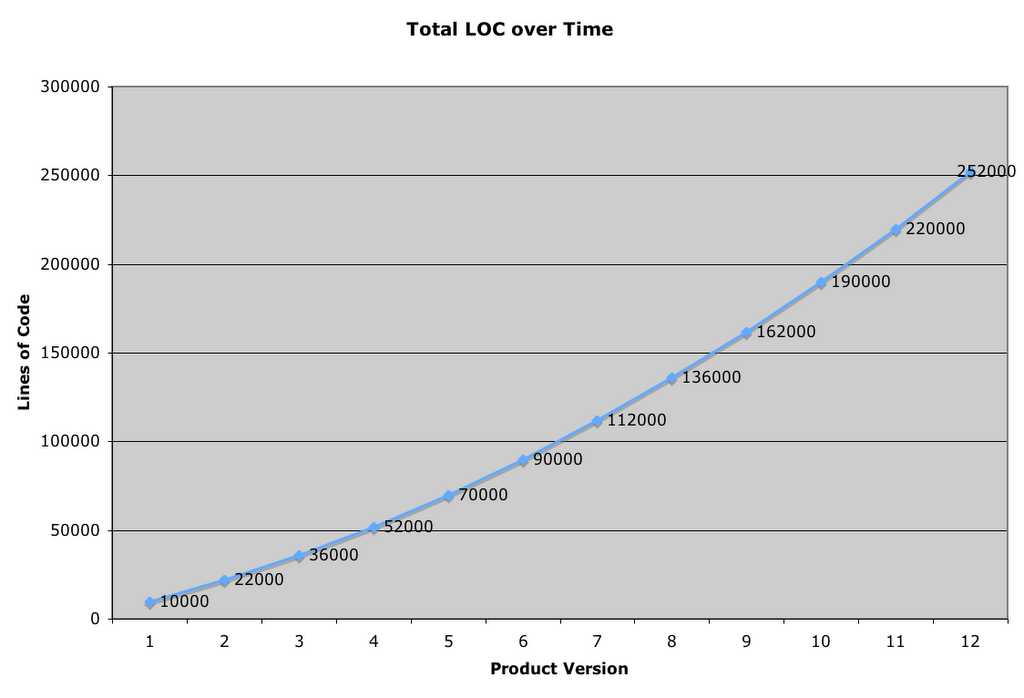
In the beginning, you're a small team, maybe 10 developers and 10 testers. (Okay, this is a huge team, but I'm trying to make the numbers easy, work with me!) You ship your version 1.0 and it's a huge success and you make loads of money! You also get lots of feedback on what could be better. So, you go to work on version 2.0. Some of what you need to make version 2.0 great is more developers. You hire one or two more developers and one or two more testers, but there is a problem: the testers must test everything in version 1.0 plus all the new stuff scheduled for 2.0. You've hired exceptional testers, and they dig in and with long hours, they are able to test sufficiently, barely, and you ship 2.0. Everyone attends the big ship party! Whoo! After a while, you look at your finances, and realize that while 2.0 was much better than 1.0, there's still a lot that could be better and your customers make that very clear. So the market for your product is not saturated which means there's still lots of upside. On top of that, your sales team informs you that by just adding feature X along with feature Y you can expand your potential market by at least double! Enthused by the success of your product you move on to version 3.0 and it's about at this point that you begin to sense some nervousness from your test team. Testers always seem to be a hyper-critical bunch, it is their job you know, so you brush off that antsy feeling, excited by your increasingly successful product. By about version 12.0 you realize what the testers were all nervous about:

Note: The numbers are fake, but the problem is real.

Let's say 1 developer produces 1,000 lines of code each product cycle. Can you see a pattern here?

The graph of code growth looks like this:

The number of testers you have working on the product must either increase with your code base or you're doomed to shipping a product of lower quality, eventually. Also, incase you're wondering, increasing your testers in proportion to you code base has some pretty negative financial implications as does pushing out your ship date to make room for more testing.

If that were not enough, there's some pretty solid evidence that that even the original 10 testers were insufficient for the initial 1.0 product code base, let alone the scaled and additional load that has grown over time! Exhaustive, comprehensive testing is simply impossible. So while in version 1.0 the testers had to make intelligent priority judgments about what to test, in version 12.0 the testers have to basically divine the future if they have any hope of getting to the critical bugs manually!

It really is this hard.

The professional testers I know have an enormous challenge at hand and must be so absolutely decisive about where they spend their time, it amazes me. Sometimes new testers, or those unfamiliar with software development, will simply think, "Hey, all I have to do is find all the bugs!" and they'd be wrong. What they have to do is find every important bug and verify that every critical code path is working. (And loads of other stuff, but that's for another essay...) You see, at the core of professional software testing, there is a built in, super advanced, internal priority system. Great testers seem to have an efficacy gene that allows them to explore the areas that are most important and identify the worst bugs. This is a skill and an art and the world could use more great software testers.

The Automation Pill

Given all the forgoing, it is absolutely incredible to me, that once a tester is given the chance to write code to automate some of their work, somehow, for some reason, this priority system goes into stealth mode. I don't know why this is. Perhaps it's the part of the brain that you use to write code messes with the part that compares the relative costs of automation. Perhaps it's the dream, "If only I could automate all the 1.0 feature testing, at least in 2.0 I could focus just on the new, fun stuff." It could be, and sometimes is, a manager, long lost touch with what core testing is all about, and now looking for ways to "drive efficiency and reduce costs" asks for something as silly as 100% automation. It could be a million things, but this is for sure: Test Automation is a fantastic tool that I believe can help with the problem mentioned above, but like most tools, when it's miss-used, it hurts.

When to Automate?

So when do you automate your tests? I don't know, for sure, but I do have some questions you might consider when making the decision. All of these questions have a common theme, and it is this: What is my return on investment for automating this test?

Script Death

When you invest time to write an automated test, you implicitly lose time you could be using to find and file bugs. That lost time will only pay off over time if your test continues to be valid for certain number of test runs. The best way I've heard this described is "script death."

When you write the script for the first time, you give it life. It lives, as long as you don't need to modify the script in any way, and the results of the test continue to be valid. If the script has a bug in it, or the product under test changes, or a new OS version changes an assumption, or a new CPU comes to town and causes your test to become invalid, your script had died and you need to re-examine if you are going to invest the time to fix it or not.

Update: I had forgotten where I had read this concept, but it was years ago. Thanks to a link, I found Bruce McLeod's weblog and a link to Brian Marick's 1998 article on this very subject of When Should a Test Be Automated?. It's a great read, I highly recommend it. This was one of the first articles I read on test automation back when we were just starting our Mac automation system.

When you write a test script, or go to update a test script because of "script death" consider the following questions. I'm sure there are other questions I've left out, but this is a start:

  • Is the feature a core/critical feature?

    Since the pay back in test automation always comes back as the script is run, will it be run many times? Automating to ensure no regressions in a critical area, like testing that a security hole is plugged, or testing a core area, like file open, and file save would be great candidates for automation because the cost of a regression in these areas is very high, and they'll be run with each new daily build.

  • Is the test tedious and error prone?

    Some tests might not be core or critical, but the testing involved is mind numbing and easy to mess up. A good example of this might be, say, opening 1,000 user documents and making sure you app doesn't crash. :-) Tedious testing makes unhappy testers, and a happy tester is a productive tester.

  • Will my test script verify results via a fragile method (screen capture) or a sturdy method (API)?

    For the automation to be worthwhile it must verify something! I've seen far too many glorified crash tests marked as automation. If you don't have verification in your automation code, then the only time it's going to fail is when you encounter a crash, a good thing to be sure, but far short of the scripts testing potential. When writing your script, you'll need to consider what methods you'll use to get data back from the system for verification. Find or make APIs that you can use (AppleScript can be very useful for this, hint, hint.) Screen shot verification is fraught with difficulty. Avoid it if you can.

  • Is the feature I'm trying to automate undergoing a lot of churn?

    One thing that will cause script death just about faster than anything else, is the product changing. This is why scripting to the API, (You do have an API right?) is so much better than scripting the UI. Typically, the UI changes much more frequently than the API ever will. Either way, consider if the feature is new and undergoing lots of change. If so, avoid automating your tests around the feature until it has settled down. (This can mean toward the end of the product cycle, which is when you are busiest looking for those show stopper bugs.) Just know, that if your test script doesn't get much value this product cycle, it will in the next provided the feature doesn't change.

  • Who or what is the "oracle" for what is correct behavior and what is not? Does that have a good chance of changing?

    Automate around things that can be verified from a dynamic oracle. All verification will need some kind of code that says, "I'm expecting X did I get it?" If you are encoding in your test script the definition of "success" how sure are you that what is "correct" will not change? If you are not very sure, move to another area for automated testing.

  • Is thet test easy to automate? Does the script have a good probability that "death" will not occur?

    If it's easy to automate something and the probability is low that things will change, go for it. A good example of this is automating your setup and install testing. These kinds of tests are going to be done over and over again and most installers have some kind of script-ability built in.

  • If this script will save me 1 minute's worth of time, and it will take me 30 minutes to write, will the script run 30 times to break even for my invested time? Will it run longer and actually save me testing time in the future?

    As you near the end of your project cycle, the chances that your automation will earn back it's investment in the current project cycle diminish. At the beginning, things are too turbulent. The best time to write automation is about the middle of the cycle, when things are mostly stable, but there are still lots of builds left to test.

  • How hard will it be to internationalize this script to test localized builds?

    Some scripts are easy to write and the verification easy to setup for your English builds, but once you localize your project "script death" becomes rampant. Keep this in mind. If you are writing a script, how hard will it be to localize the script when the time comes? Can you write it "OneWorld" from the beginning? If it is almost certain your script will die on the localized builds, don't plan on using automation to augment your localization testing with out significant work on your test scripts.

  • When this script fails, how easy will it be for me to investigate the failure?

    Investigation is by far the most time intensive part of test automation. Write your scripts so they are atomic or very specific in what they test. Don't write test scripts that run for 30 minutes, unless that's the explicit purpose of the script. You don't want to be running a script for 30 minutes just to repro the failure that occurs in the 29th minute of the test execution. Write your scripts so they are super easy to read and so that the logs "yell" what the test is and how it is failing. Your automation harness will play an integral role in how easy it is for you to investigate your automation failures.

    Small, atomic scripts run great in parallel!

  • Can I trust this script to really test this part of the feature?

    There is often a hope that automation can some how magically babysit a feature just like a human tester running through a test plan. This is simply not true. A human can see so much more of what is going on and pattern match a thousand different things simultaneously. An atomic automated script will have its blinders on and be fully focused on verifying only what you specified when you wrote it. Don't under-estimate how stupid automated tests can be.

    In closing, automated testing is not a silver bullet that is going to solve all the problems of testing and software development. It is a valuable tool that you'd be silly not to employ in managing the complexity of software testing. I believe James Bach said it best:

    "I love test automation, but I rarely approach it by looking at manual tests and asking myself “how can I make the computer do that?” Instead, I ask myself how I can use tools to augment and improve the human testing activity. I also consider what things the computers can do without humans around, but again, that is not automating good manual tests, it is creating something new."

  • 19 April 2006

    A Tour of Microsoft's Mac Lab

    Today I'll stop my 3rd person perspective. I'm going to write a little bit more about what I do to help MacBU ship great software and provide some color around what's it's like to work on Mac software at Microsoft. Often when we have press events or special visits from our MVPs I'll give them a tour of the Mac Lab and explain what we do. They've always found it very interesting and so I thought I'd share a virtual tour of our Mac Lab. Let's get started:

    Lab Door

    We start with the door. The Mac Lab is about 2000 square feet of solid computers. The calendars you see down the side of the wall we use to mark team birthdays as well as special events. The CD on the door is an old Apple Software Restore CD from the last beige Mac Apple produced, the Power Macintosh G3.

    The "Sandbox" and Plasma display

    The first area in the Mac Lab is what we call the Sandbox. This is where we keep all significant hardware configurations Apple has released that run our products. We'll use the Plasma display to, watch DVDs and play games, uh er, I mean, do important training presentations. ;-) It's actually very useful because everyone can be in front of a computer and still see the main screen and follow along. Often other groups at Microsoft (the games group, hardware drivers group and even the Windows media group) will come and schedule time in the Mac Lab to test their software on the different hardware configurations.

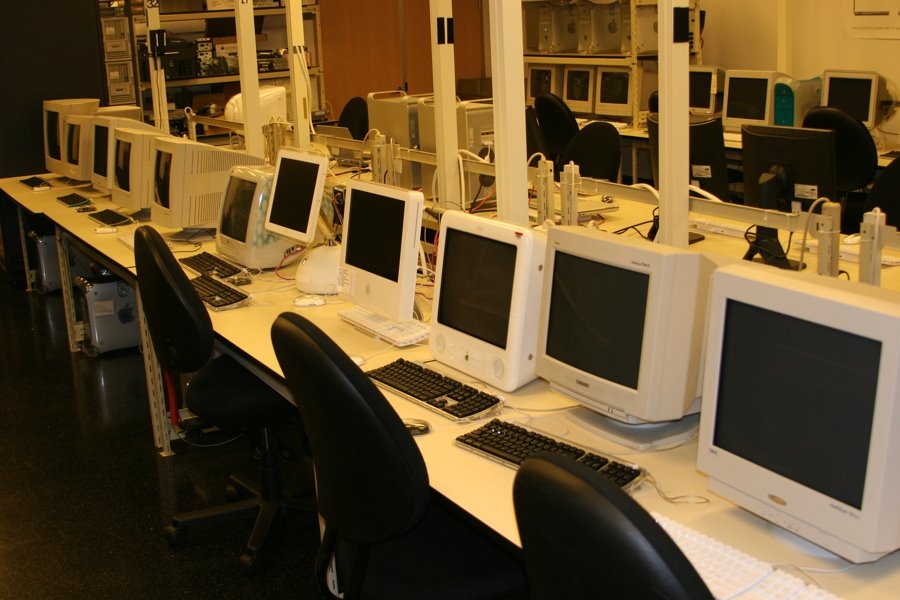
    Old iMacs and iBooks in the distance

    More Macs

    We have lots of Apple hardware. You can see here the old colorful iMacs along with some of the old iBooks. You can also see two of our Lab Technicians working on the backup systems, but more about that later. Up until a few months ago we had every significant hardware revision Apple has ever released since the dawn of time. We even had a section of the Lab we affectionately called the "Mac Nursery" where we kept all the older Macs going. We even had an old SE/30 and IIci and super expensive Mac II all connected via PhoneNet running Spectre, just for fun. It's always super fun to boot Word 1.0 or Excel 1.0 on these old machines and see how much things have changed. Due to lack of space in the Lab we had to put all of these older machines into storage and recycled the following:

    • Macintosh (original)
    • Macintosh SE
    • Macintosh SE/30
    • Macintosh Classic
    • Macintosh Centris 610 <-- I had this one in my room during high school
    • Macintosh IIci
    • Macintosh IIsi
    • Power Macintosh 7100/66
    • Power Macintosh 7100/80
    • Power Macintosh 7500/100
    • Quadra 650
    • Power Macintosh G3
    • Duo Dock with Powerbook Duo 2300c
    • Power Computing PowerCenter Pro 210

    May they rest in peace.

    ADIC Backup Robots

    One of the realities of working with computers is that things fail. More often then you might think. We've used different backup robots, but ever since we moved to ADIC we've never had a robot failure. They just make great stuff. We have 3 robots and use Veritas Backup Exec. It works pretty well, as you can see:

    Lots of backup tapes

    We also do offsite backups just incase "The Big One" hits, but for regular use these tapes work just great, except when they don't. Recently we had a failure and lost 400 GB of data! We restored it from the tapes and then discovered that the Mac version of the Backup Exec agent had a corruption bug causing the restores to be compromised! Veritas folk were super responsive and they should have a new Mac agent out soon. Backup software and file systems are in the class of software that simply must work, all the time. Alas, this is not always the case.

    I'm going to skip the "Build Lab" section of our Lab since it's very much in transition. Maybe I'll post about that later. For now, on to our automation system!

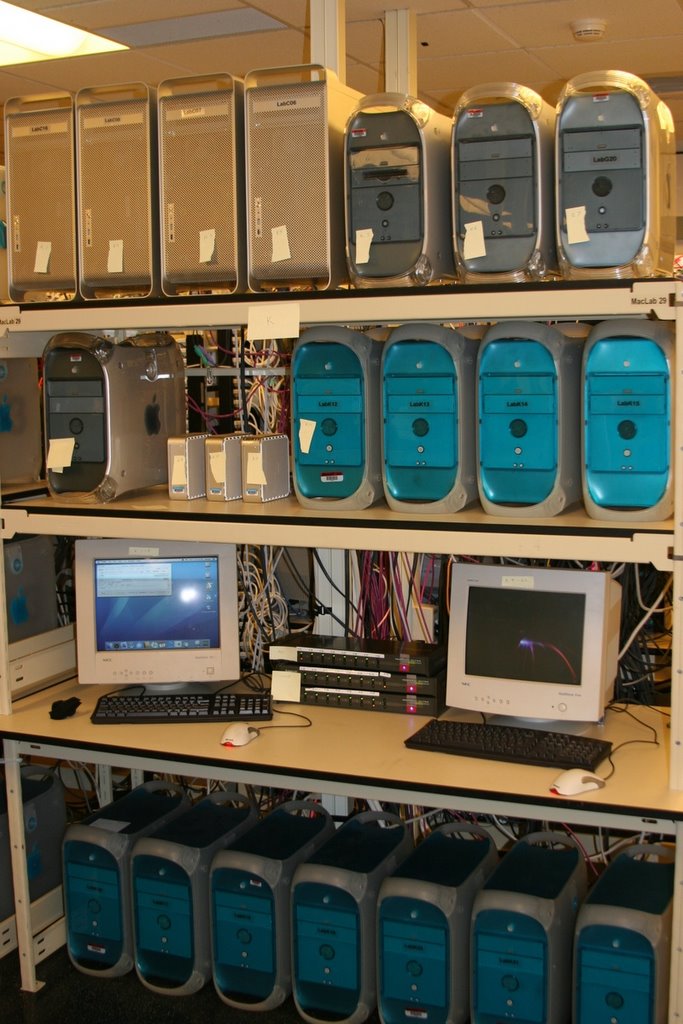
    Mac Office is one of those "software in the large" projects. There's really no way a team of our size would be able to adequately test all of Office without the use of automated testing. Every day we get a new build of Office from the build machines, we copy it to our Xserve RAID connected to our dual G5 Xserve for access by our 249 automation machines. We then run thousands and thousands of tests on the new build. Typically we get 4 builds of Office each day: English Ship, English Debug, Japanese Ship and Japanese Debug. We run our entire battery of tests against all the builds and then report any failures to testers via email. The testers investigate the failures, log any bugs and then move on to their other duties as testers. This turns out to be very effective, if used properly, and over time it allows testers to focus on things humans do best, while letting computers verify the repetitious and mundane, but necessary, testing. It all started with our Blue and White G3s years ago. At first when testers would upgrade their test machines, instead of recycling the machines, "The Lab" would get them to add them to our automation machine pool. I think we had about 20 machines to begin with.

    Venerable Old Bluies

    After some time we started getting Gray G4s...

    Speedy G4s

    Then we upgraded to some dual proc machines...

    Dual G5s

    Then Apple give us a special gift. :-) You'd be probably be very surprised at the cost of running all these machines. There's the obvious electricity costs, but also cooling costs and even the physical space costs. Additionally, our system scales, not with CPU horsepower, but with quantity of machines. Most of the tests we run don't run significantly faster on a dual G5 vs. a single G4. So when Apple announced the Mac mini it wasn't minutes before we were considering how to use it for our automation system. The Mac mini has all the perfect qualifications:

    1. Low power
    2. Low heat
    3. Small
    4. Easy to pack together
    5. Inexpensive

    So we got a few to test things out...

    Mixed Automation Rack

    And then we made the big purchase:

    Rack A, B and C = 150 Mac minis!

    These work extraordinarily well. You might wonder how we control all these Macs. We use two methods: KVM switch box and Apple Remote Desktop. Thanks to our Lab Manager's great relationship with the IOGear folk we have a very reliable solution these days. It seemed like it took for ever to find a USB KVM switch box that didn't leave the machines "headless" after random reboots. The 8 port USB KVM from IOGear has been rock solid. So what does it look like to sit in front of 64 Mac minis? Like this:

    64 Mac minis: 1 keyboard, monitor and mouse

    This works very well when you must access the machines physically. Even so, just scanning each Mac for 1 second gets very old, very fast and Apple Remote Desktop comes to the rescue! When we need to see all the machines at once we just select them and BOOM! they're there. It also gives us what I believe is the one true reason Apple invented the 30 inch Display. ;-)

    The 30 Inch Display: Fulfilling the measure of its creation.

    ARD displays 50 machines at a time and when you have a capable machine, it uses the "cube rotation" effect to move from one group of 50 to the next. I got a picture of the effect mid rotation below:

    Rotates like butter!

    So how does it all work? Like this: On each machine we have two volumes: ChangeOS and Mac OS X. The Mac OS X volume is where we install the different versions of the OS. We boot to the ChangeOS volume to free up the Mac OS X volume for modification. When we trigger an automation run we specify the OS version and language. Each machine then reboots to the ChangeOS partition, caches the OS .dmg locally and uses the asr command line tool to restore the image. The tool that does this work is one I wrote (in AppleScript Studio no less!) called Lab Assistant. We have images of the Mac OS from 8.1 all the way up to 10.4.6 in all the languages our products support. It's a lot of data which brings me to the backbone of our automation system:

    Our Xserve RAID and XSAN

    1 TB

    Right now we've just been testing out the XSAN stuff to see how we want to use it. That's why you see all the Xserves. Just one side of the top Xserve RAID is 1 TB of data. For a fun comparison this whole rack which is about 7 ft tall is full of old RAID arrays is also 1 TB of data storage. We call it the Big Mac Daddy.

    Big Mac Daddy

    Other groups at Microsoft have hardware retention policies that force hardware upgrades every so often, but instead of just "recycling" these server machines, our Lab Manager intercepts them on the way out, and we use them for various things, storage, SQL server etc. We actually have some of the old MSN servers in our Mac Lab!

    Hallways

    When you have so many machines to maintain, being able to get behind the machines is very important.

    Lots o' cables!

    Top View

    We like to pack in those Mac minis and the cords get pretty dense when we do. The hanging Mac mini box moves if the HVAC is working. If it's not working, we've got to turn off the machines until it's fixed.

    Our main automation Xserve has a habit of failing in some serious way once a year, always around Christmas time. :/ For the last 2 years I've been in charge of fixing it and getting it back to operational. Most of our server racks are generic white enclosures, but we do have 1 black Dell rack. As punishment for bad behavior, we put the Xserve in the Dell rack. That'll teach it. ;-) This is what it looks like from the inside of the rack looking out on the world. Poor caged servers...

    From the server's perspective

    Of course our iWork/iLife balance is just fine as you can see by the following:

    Tornado Foosball Table

    One of our team members bought this awesome Tornado foosball table which we use along with and XBox and XBox 360 to relax after a hard days work.

    Published!

    A while back the Seattle PI actually did a front page story on the Mac Business Unit and you can see from the picture in the Lab it was when we had only the G3s.

    Gotta have the Mission Statement

    As you enter the kitchen we have our MacBU mission statement to remind us what it's all about. :)

    Free drinks of course!

    Just like everywhere at Microsoft, we get all-you-can-drink beverages.

    Fun Times!

    Part of our team mantra is that we work hard, and play hard. So we do lots of fun morale events. We just take time off work and do stuff. We're good friends and enjoy "just hanging out" together.

    The Mac Library

    This is just a pretty picture to represent what is really a much bigger collection of 3rd Party software we use to test with Office. Most if it is stored on file servers, but this gives you an idea. (There's some old WWDC DVDs if you can find them!)

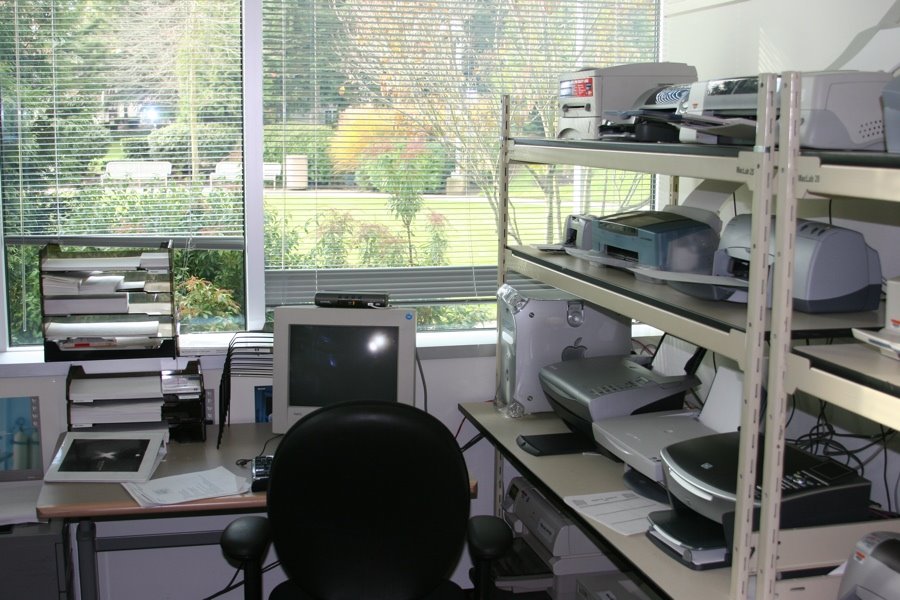
    Printer Lab

    More Printers

    All connected for printer testing

    They're beautiful

    A big part of Office functionality is printing, and we do loads of print testing. We work really closely with the printer vendors and make sure the printed page looks great. WYSIWYG is fundamental to Mac ethos. All these printers are connected via USB hubs and Ethernet to a Mac OS X Server 10.4 which is the printer server.

    I hope that gives you a better idea about what the Mac Lab is like and what it's like to work in the Macintosh Business Unit at Microsoft.