Showing posts with label future technology. Show all posts

29 April 2008

By Example

Microsoft's recent introduction of Live Mesh is a perfect example of a core difference between Apple and Microsoft. Apple is, at heart, a product company. Microsoft is, at heart, a platform company. Both produce products and platforms, but the way they approach the problem and communicate with developers is decidedly different.

With Live Mesh Microsoft says, "Come, build on our platform and do amazing things!" What is the oft cited example for using Live Mesh? Multi-device synchronization of data. Now, to be sure, this is a big and very hard problem to solve. In fact, I really wish Apple's Sync Services were much, much better, but do you wake up in the morning thinking, "Man, I really have a Multi-device synchronization problem?" Most people don't. What they do think is, "Man it's great that when I put stuff on the web, I can get it wherever I am. All I need is a web browser." You see, syncing folders or sharing data across devices isn't top of mind in the way a developer thinks about it. Microsoft's challenge is mapping their platform to real problems in a persuasive way.

Contrast this with Apple's normal product focused pattern. First they release a product that solves a real, tangible problem people have. Say, "I hate it that I have to carry around my iPod and my Cell phone everywhere!" or "Man I wish I could buy that cool song I just heard, right now." or "I have so many digital photos, I wish there was an easy way to do something cool with them." or "Man I hate it when I loose files on my computer, I wish I could just go back in time." To solve these problems Apple, like Microsoft, has to build a platform, but this platform is built for a product first, which they use and improve. Then when they talk to developers they can say, "Did you see this cool thing we just did? You can do the same thing or even something better! Here's how we did it..." It's the difference between saying, "Here are the tools, let me show you how to use them." and "I used these tools to do this great thing. Let me show you how and maybe you can do the same thing." Ultimately, it's leadership by example.

Another great example is Apple's use of the Cocoa APIs in their own applications. Apple builds amazing products and then is able to say to developers, "We used the same APIs available to you today!" Contrast this again to Microsoft. Windows Vista was released with some remarkable new C# APIs. Many of them very cool and very interesting, but what is Microsoft Office written in? C and C++. What APIs does Office use? A multitude of Office only APIs and libraries shared among the applications. Does this hurt C# and the new "WinFX" platform "street cred"? I think so.

Ultimately, Apple and Microsoft are trying to solve many of the same problems, but the path you choose while logical to you, may not be so logical to those you most need to persuade and inspire. No one can argue with the results. For me Apple's "solution first, platform second" approach makes for easy understanding of new ideas as well as providing the activation energy needed to try something new.

09 July 2007

The GM of MacBU wants to talk to You!

The general manager of the Macintosh Business Unit at Microsoft is Craig Eisler. He's been here now for just over 4 weeks. It's been fun to watch him step into his new role and if nothing else watch as everyone adjusts to a new dynamic leader. Craig seems to be just that, a high energy, leader. His transparent nature and naturally positive perspective on things has just instantiated itself on our official MacMojo blog. He's asking for suggestions on what you'd like to see different, feature requests, even topics that you'd like to see him personally address on the blog. Right now there are only 39 comments. Please, if you've ever wanted MacBU to do "X" differently, now is your chance. Get in there and leave a comment.

12 June 2007

iPhone requires iTunes account?

I just got the second email from Apple after signing up with them for breaking iPhone updates via email. I read the mail a little bitterly, since I felt the least they could have done was to send me an email when they had the ship date nailed down. Well, the tone of the email was mostly, "Here are things you can do to get ready for your iPhone...", but it ended with this:

To set up your iPhone, you'll need an account with Apple's iTunes Store. If you already have an iTunes account, make sure you know your account name and password. If you don't have an account, you should set one up now to save time later. To set up an account, launch iTunes, select the iTunes Store, and click the Sign In button in the upper right corner of iTunes. Sign in and you're ready to go.

My first thought was sure, you'd need one if you wanted to use protected iTunes content, but on second thought, I wondered, could this be something more? Could it be that you'll need an iTunes account for other iPhone features to actually work, like maybe purchasing music from the store over WiFi? Could this be how ring tones are purchased? Could this be the mechanism for adding Apple applications and features to your iPhone? Maybe some integration with a new and improved .Mac service, like real time sync? Maybe to make up for the forever lost hidden features in Leopard, there will be some "sweet" hidden features in the iPhone? Nah, never mind.

Forward Looking Font Display

Yesterday, Apple released their own Safari 3.0 web browser for Windows XP and Windows Vista. Amid the security and performance comparisons, folks are also noticing that Apple has also ported their own sub-pixel display technology to Windows. Joel Spolsky summarizes the differences sucintly:

Apple generally believes that the goal of the algorithm should be to preserve the design of the typeface as much as possible, even at the cost of a little bit of blurriness.

Microsoft generally believes that the shape of each letter should be hammered into pixel boundaries to prevent blur and improve readability, even at the cost of not being true to the typeface.

I think Apple's method will turn out better when we all have resolution independence along with hi-resolution displays. The real question is will the current font display fuzziness in Safari turn off the current unwashed masses, so that even when hi-res displays become standard, it's too late. If that happens, Safari will follow a great Apple tradition: high technology ahead of its time.

23 May 2007

Silverlight

The best thing about Silverlight is its icon. For regular users it's a web-browser plugin that allows you to view and use Silverlight content. What Silverlight content is there? Media and stuff. Have you ever seen a website done completely in Flash? Well, now you can do that but with Silverlight. From my perspective this is fundamentally about competing with Flash. There are some cool things going on under the covers to make this happen and as a developer, I understand the geek factor there. By the same token, as a developer, my ability to develop amazing software is directly related to the toolset available to me. So I ask myself, "Which toolset gives me the greatest ability to develop amazing software?" Flash or Silverlight? PHP or Ruby on Rails? Cocoa and Core Animation or XAML and .NET? I don't think I can compare any of these with much authority, but I have a hard time believing that the next killer app, web or otherwise is going to show up as a Silverlight application. Still, I love the icon.

05 April 2007

Great by Default

The Future Parc at the Cebit trade fair in Hanover, Germany is a place to showcase future technologies. I didn't go, but two of the products I read about caught my imagination and got me thinking. Here they are:

Tobii Technology's eye tracking system

It's one thing to use multi-touch to move things about on the screen, but it's quite another to simply look at something, and have the computer recognize where you are looking and move your pointer there. A blink or a tap on the keyboard and you've clicked. I'd love this technology simply to review how folks use software. It's hard to tell, but it doesn't look like the "device" is that intrusive for installation in regular computer displays. In fact, Tobii even sells eye tracking hardware to OEMs that can, "provide eye gaze point, eye/head position and pupil size data. ... There are no external cameras or lightning units. ... The user does not need to "do" or "wear" anything and can move freely. Tracking is fully automatic and high accuracy can be relied on regardless of glasses, contacts, eye colour, age, ethnic background or light conditions."

The Fraunhofer Institute's Face Finder

The Face Finder is a system that can find faces, human faces even in low lighting conditions and then recognize if the face is angry, happy, neutral, sad or surprised. Of course they say this could be used for targeting advertising (an original business plan, I know...) but I think there's potentially a broader application in terms of simply recognizing when it's appropriate to "interrupt" a user. In my opinion, computers should keep things quiet when we are "in the groove" in order to maximize our effectiveness. This kind of technology seems a great fit for answering the, "Is it okay to notify the user event x just occurred?"

Both of these inventions require a computer with a video camera or some sort of hardware video device. I don't know if you could build an eye tracking system with only one iSight video camera, or even if the video camera installed on my MacBook is sufficient quality for something like Face Finder, but every new Mac that ships with a built in video camera makes for more fertile soil in which innovations, just like these can sprout, grow and even take root.

One of the things I've always loved about Apple hardware is that you can't order a "stripped down" version of any Mac. How long has Apple included FireWire standard with every Mac? More recently the Apple remote is "default equipment" with any Mac and a built in video camera comes with any Mac that includes a screen. By keeping the "lowest common denominator" experience so feature rich, Apple is able to create experiences that simply start at a higher level. Both Apple and their developers can assume a certain quality of system that Windows developers fundamentally can't depend upon. In my opinion, this is one of the reasons it's always so exciting to be a developer on the Mac platform.

It's never too late to start! :-)

21 March 2007

How to Talk to People

Don Norman has published a wonderful excerpt from his next book "The Design of Future Things" set to publish in October 2007. The excerpt is purportedly a research missive from future machines to other machines on how to deal with people. Certainly some of us lowly humans can relate to the difficulties of communicating effectively with other human beings. (We could also probably say some things about what it's like to communicate with modern-day machines.) What follows are some choice quotes from the article.


It isn't easy to communicate with them; people take suggestions as criticism and get defensive, and sometimes angry. They misinterpret our utterances, ignore us, or overreact. Sometimes we just can't win.

Five Rules of Communication From Machines to People

  1. Keep things simple.
  2. Always give people a conceptual model.
  3. Give reasons.
  4. Continually Reassure.
  5. Offer a feeling of control.

People have difficulty with anything complicated, and they don't like to listen. So make the message short. In fact, it's better not to use language at all--it takes too long and, besides, human languages is horribly ambiguous.

The best kind of communication is done subconsciously, so people don't have to interrupt their conscious thoughts to attend to them. Thus even for the most befuddled minds, we need to communicate so that the meaning is clear.

Give them something their simple minds can understand. A conceptual model is a fiction, but a useful one as it makes them think they understand.

In short, people like pictures and diagrams.

Our early 21st Century Cars had almost given up trying to explain to people that they should drive more slowly on wet roads. But then we discovered that if we made it seem as if they were in trouble by faking skids and sliding around on the road, people would beg us to slow down. Sliding and skidding fit their model of danger far better than any words could have done. So wherever possible, don't try to tell them--let them experience it.

But the bottom line is, if people haven't seen anything happening for a while, they get anxious, even jumpy. And no one wants to deal with an anxious person.

[Make] them feel as if they are in control, even when they aren't. Keep up that deception--it's very useful. People like to be in control, even if they are performing a task really poorly.

Any time you have to make recommendations, make people think the ideas are theirs. If you really have to do something fast, just don't let them know: What they don't know, doesn't bother them.


There's some wisdom hidden in these quotes. Check out the whole thing, it's a fun read.

Update: Originally, I had some snarky, toung-in-cheek comments about each of these suggestions, but it just didn't come off like I wanted it and obscured too much of the real value in Dr. Norman's suggestions, so I've removed them.

22 February 2007

Welcome to 2013

Every once in a while me and some of my buddies will get together for lunch to prognosticate and pontificate. The "rules of engagement" are that you argue the future of technology with the assured confidence of Steve Jobs, while still being nice. ;-) Today, you won't get the laughs, the jeers, the oohs and aahs or even the subtle interplay of the multiple ideas and feelings as we sit around the table and guess about the future, but you will get part of my view of things and you'll just have to imagine the rest. So with that preamble, let me start with what the world looks like in 2013:

To begin with everyone has at least one, but most have two, 30" displays at work that support multi-touch and have embedded hi-res cameras. Screens haven't grown much taller, but they will have grown wider. People carry around their iPhone on which resides all their digital assets. They walk up to a workstation and "plug in" to run all their customized programs and data coming off their phone. Laptops still dominate, because, well, they have a keyboard and mouse that work, but they are the peripherals of the phone, the iPod, the communication device, not the other way around.

The user experience isn't just about being pretty and functional anymore, it's about making the work you do fun, in a very game-like almost surreal kind of way. Of course it's efficient, because it's fun to be successful at what you do! But it's not just about being efficient anymore, it's about being beautifully efficient and deeply effective.

In this world of 2013, all desktop applications, as we know them, continuously bounce back and forth between two states: fully online, and partially offline. While all the user's data is stored on their local device (read their iPhone), they know that when in range of any wireless signal, their data is being securely and automatically backed-up and kept in sync up with all their other peer devices. Normally this is the cloud for down-level, but always accessible access, their home and work computers, their entertainment center and car and of course their iPhones. Yes, most people will have one "work horse" iPhone and another smaller, lighter, "more invisible" if you will, model.

Documents are far from dead in this environment, but they are more dynamic, they are less the end, but the vehicle for the process of learning and discussion. The standard way to transmit rich but static read/only documents will continue to be PDF. Word processing will move to be more about design and layout than about text macros, spell checking and print out. PowerPoint presentations become less about bullet points and more about data visualization. Excel workbooks finally take on embedded SQL back-end for deep data-sets. This simultaneously thrills regular users who always knew Excel was a database, while frustrating DB admins worldwide. Excel "views" on to any data set auto syncs back up to and around with other people and servers. PowerPoint presentations include Bonjour enabled real time text chats on the presentation's "side screen" if enabled for the presentation. The typical method for connecting to a HD presentation display is simply connecting your phone to the projector and driving the phone with the button on your phone's headset over a secure wireless connection. Your headset will also record your presentation for later automatic transcriptions or playback.

Email and News isn't so much about "getting to done" and reading all the email and news coming your way. It's much more about training your "inbox aggregator" to sense the signal in the noise. Which people and sources consistently produce high signal work will be the basic factor. Your work will be to both broadcast so that people will want to subscribe to your data-out-stream, but also aggregate the common themes coming in. Spark-like, the software will identify the new, the novel and out of the ordinary. Analysis of your reading, response times, collaboration habits, phone calls, even tracking your focus on the screens will help the system to make connections and inferences and your projects and priorities will there by emerge. The complex patterns over time will create a data set that you can both tag with good and bad behaviors which the system can use to help you do more "good things" and fewer "bad things." When the system senses you are "in the zone" phone calls, IMs, even background applications fade from view allowing your to focus and really think and really produce. This kind of pattern analysis will be done both locally as well as in the cloud. The system learning will happen in both places.

Help systems will be much more user developed, driven and updated with a few mavens driving the core content. Person to person personalized help will emerge: This is where you can call someone and get a personal response in your own language, from the same support person you have grown to like, within 24 hours. The help system extends beyond just using an application, becoming more like a workflow analyst and personal coach. Help systems well done become a modest profit center for those few companies who figure out how to serve personally, not just quickly. This premium help service becomes something people love to pay for, because of the way it helps them directly improve their day to day work. Think of it as life hacks, evolved and distributed.

Software updates and personalization of software on the fly will mimic and then surpass the current web based model. Users will be able to log feature requests directly in the applications they use. Developers will be able to respond in aggregate or individually. Web apps will support roll forward upgrades, while desktop applications will support seamless roll forward upgrades and roll back downgrades. The roll back ease will allow for people to bravely try out new features in newer versions without the risks of all our nothing upgrade decisions. When a bug or feature they requested is fixed or something similar added to a new version of the application of which they don't have, they will be notified. Think of it like out of band email feedback and support, or like FogBugz stuffed into each application you own.

Video conferencing will be available most places and no one will use it except for one to many lecture style communication. What they will use is screen sharing, document sharing and white board sharing while high quality audio, text and data sharing collaboration will be the norm. Conversations will naturally move from audio, to audio and text chat, to screen sharing, to document editing to white board sketching and back to basic text all with the effort of adding a new party to a conference call on the iPhone. Even with all this communication technology, person to person visits will remain he most effective form of collaboration. As such, most systems will tend to lead you from lower communication models to higher communication models, given your particular context.

User interfaces will provide greater affordances for the human user. Not just skins and layout changes, but reading text summaries into audio files to be processed and listened to while moving from place to place. Reminders to get up and stretch, take a break. Zooming in and especially zooming out spatially will help people not only to read better as they age, but to step back and gather greater context, then focus in on the most important information or task. Audio will be used slightly more to provide feedback, but displays that can "thump" or provide force feedback when touched will also allow for better interactions. Where today we use "if statements" then we will use Bayesian probability in making our decisions.

The most important aspect of software design will be the answer to this question: How can we optimize this experience such that the things humans are good at are made easy, fun and amplified, while the things humans are generally poor at are made automatic, simple, out of the way, multi-tasked, yet controllable, abstractly knowable and understandable.

In this world, technology will not be the enabler or even the competitive advantage. In 2013, technology will be the raw material upon which and out of, much of life's daily work and play will be built. In 2013, people will have gotten over technology, less will be the worship of technology as some magic cure all, more the understanding of technology like a bicycle for the mind, the heart, and even the soul. And so here's to a softer time. A time when the real world, not these virtual intellectual properties, but the actual world around us takes preeminence once more.

21 August 2006

In hope of an iPhone...

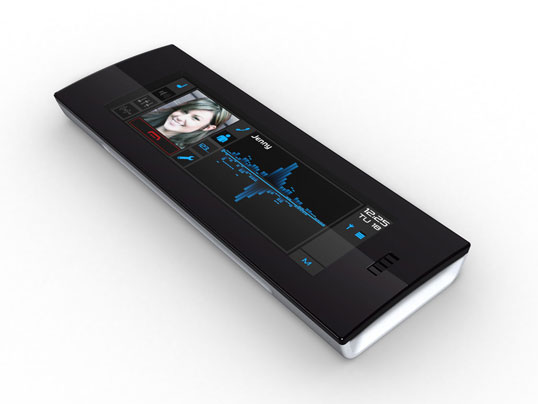
Here is a phone from Synaptics. The coolest part about the phone? It has no keys, just one big touch screen canvas. I guess, if you are going to remove stuff in a drive for simplification, removing the key pad is about as far as you can go. On the other hand, this just puts more burden on the software designers of the interface to use the touch-pad well. My experience with touch screens has not been that great. The biggest problem I see is that without a pointer device, it's hard to get feedback on what you've touched because your finger obscures what you are touching. One way to solve this, is with huge buttons, that allow for a color change that you can see around your finger or thumb. The problem with big buttons is, well, they're ugly. Here's to Apple solving the feedback problem along with a clean and beautiful UI.

01 August 2006

Software Factories

Now this is interesting. Jack Greenfield and Keith Short take on the future of software development:

Total global demand for software will grow by an order of magnitude over the next decade, driven by new forces in the global economy like the growing role of software in social infrastructure, by new application types like business integration and medical informatics, and by new platform technologies like web services, mobile devices and smart appliances. Without comparable increases in productivity, total software development capacity seems destined to fall far short of total demand by the end of the decade. What will change to provide the massive increase in capacity required to meet demand? It is not likely to come from adding developers. Instead, software development methods and practices will have to change dramatically to make developers much more productive.
Read the whole article here.

Martin Fowler has a whole essay on this topic: Language Workbenches: The Killer-App for Domain Specific Languages?

Most new ideas in software developments are really new variations on old ideas. This article describes one of these, the growing idea of a class of tools that I call Language Workbenches - examples of which include Intentional Software, JetBrains's Meta Programming System, and Microsoft's Software Factories. These tools take an old style of development - which I call language oriented programming and use IDE tooling in a bid to make language oriented programming a viable approach. Although I'm not enough of a prognosticator to say whether they will succeed in their ambition, I do think that these tools are some of the most interesting things on the horizon of software development. Interesting enough to write this essay to try to explain, at least in outline, how they work and the main issues around their future usefulness.
And to round out the discussion Neil Davidson responds to Steve Cook with this insightful comment:
As much as I find the technical side interesting, the thing which really fascinates me is how the way people write software will change in the future. ... I've been thinking about it a bit, and I think that although the analogy with the changes in industrial manufacturing (from craftsman to mass production to mass customization) is interesting, I'm not sure it really holds true.

I think one of the key things you mentioned was the analogy to the supply chain, and how this chain will lengthen. The way I see it, software will always need a craftsman at one end. Software is intrinsically hard to do, and requires people, or teams of people, to think very carefully and deeply about what they're doing. The tools, processes and components they use will have to change though - it is at this point in the supply chain that I can see mass production happening. I think the analogy is that you're always going to need craftsmen like carpenters and bricklayers to build a house, but the tools, techniques and materials they use will be mass produced. At the moment we're at the stage where the bricklayer makes his own bricks, and the carpenter cuts his own trees down. I don't think the craftsman will be replaced, but the tools he uses will be provided by companies who provide (or are) software factories. That's the point I was trying to make about a few companies dominating the market - somebody will discover that they can produce an e-commerce software factory and sell hundreds of thousands of the things at $1,000 a piece rather than two or three a year at $100,000 a go (because it's no longer a problem constrained by people's time). Presumably Microsoft believes it will be them and that's possibly part of the reason why they're entering the CRM, accounting and business markets.

Does Apple see any of this? Do they think it all too distant to consider currently? Either way, what an interesting time to be developing software!

Hyanide: My Tank Bike

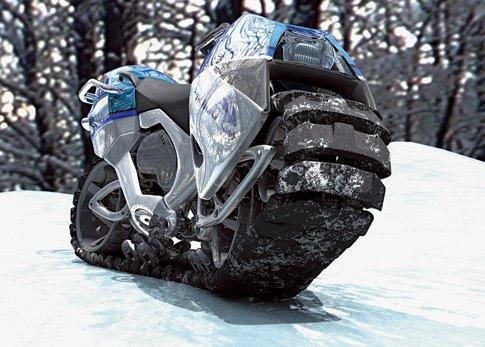
I've posted before about my dream car, but I just found my dream bike: The Tank Bike.

German designers Oliver Keller and Tillman Schlootz presented their extremely extreme personal tank concept for the 2006 Michelin Design Challenge, showcasing vehicles made especially for California's diverse and often rugged topography. Hyanide's tread contains 77 (holla!) identical plastic-covered segments of Kevlar rubber held together by Kevlar rope. Each segment flexes independently, allowing fluid multi-directional movement suitable for any conditions including deep mud, sand and snow.
No more bent axles or broken crank shafts for me!

25 July 2006

My WWDC Wishlist

After reading John Siracusa's hilarious post about WWDC Buzz Word Bingo, I got to thinking about what I'd most like to see at WWDC. Here's my list:

1. Make it brain dead simple to write multi-threaded applications.

How simple? If my application runs fast on a dual core machine, I want it to run twice as fast on a quad-core, no recompile. Too difficult? I'd settle for automatically routing all AppKit method calls to the main thread only, so anything the user sees with their eyes is on the main thread, but everything else happens on other threads, no extra coding by me.

2. Widescreen iPod phone

First and foremost, make it a great phone. Second an iPod. Third, and a distant third at that, a platform I can build upon.

3. Video Airport Express

Encode TV signal to MPEG 4 and send to my Mac's disk drive in real time while I watch another channel streaming from my Mac.

That's it. I'd be happy with that.

P.S. If you are going to be at WWDC this year, drop me a line. I'll be there, and I'd love to chat!

28 June 2006

Words Matter

When I wrote the title for this post, it seemed almost trite. I don't mean it to be. The words we have at our disposal define the thoughts we are able to think. If you've learned another language and become fluent enough to think in that language, you know what I mean. I spent two years in Brazil as a missionary and grew to love the Portuguese language. While I took my required 2 years of German in High School, there's nothing like living the language to teach you subtleties of the words. There are some ideas that simply can not be described in another language. The Portuguese word saudade, I think, falls into this category. Further, there are the synthetic languages, like Arabic, where I understand that one symbol can take a whole English paragraph to explain! Simply put, the words you use matter, and more than you might think.

My coworkers often chide me, because when I have a new idea, I'll spend hours trying to come up with the name for the thing. Why? Because it frames the way you think about the idea and code names simply don't switch well. You've got to get the name first. I've never really been able to explain this, but I just heard a speech given by Bruce Sterling that I think finally explains the idea really well and introduces several new ideas along the way. The Internet of Things, check it out.